

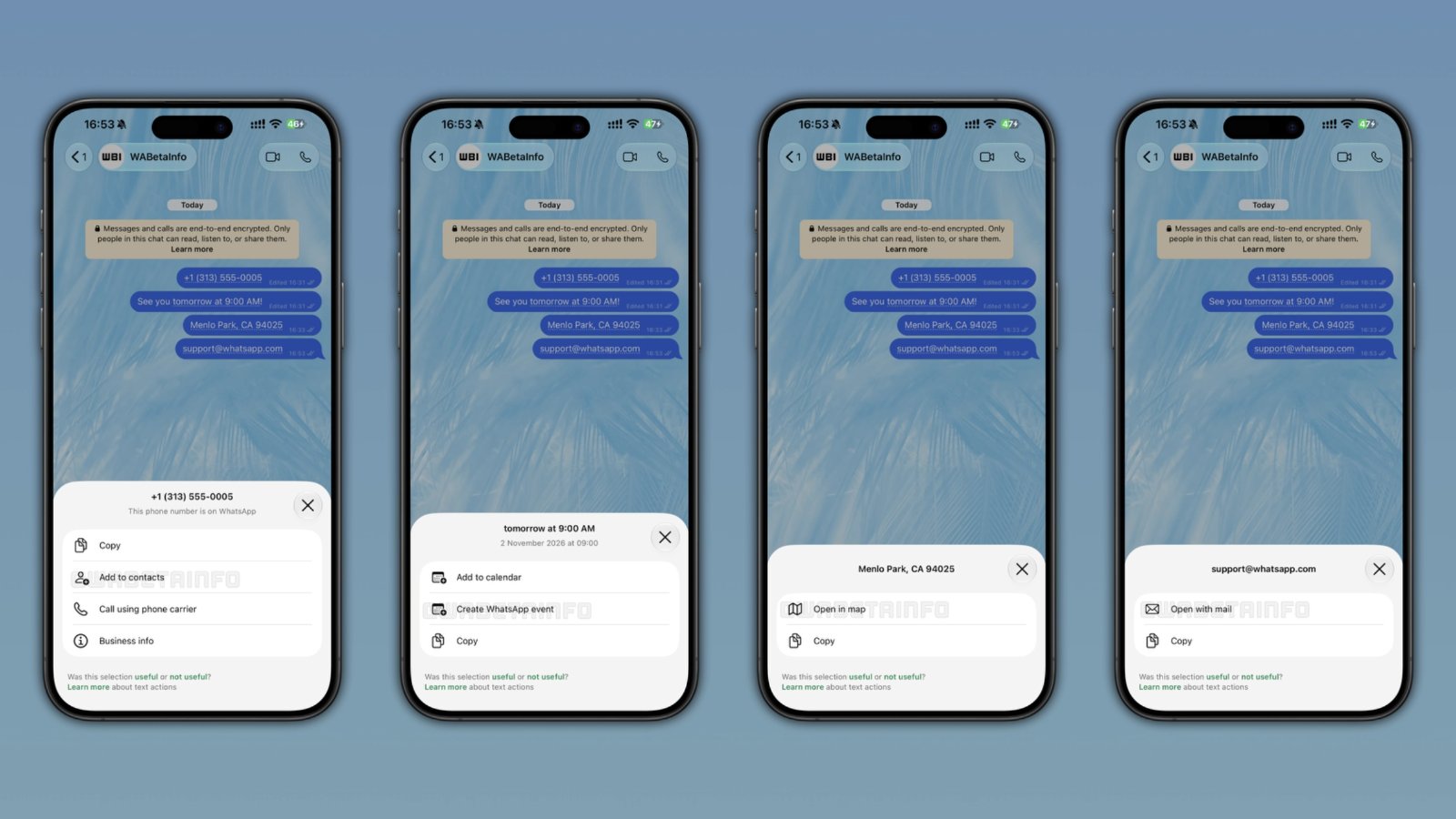
Spot a dotted underline under a phone number or date in your next WhatsApp chat – that’s not a typo, it’s a new shortcut.
WhatsApp is rolling out a feature called text actions on both Android and iOS. It automatically detects things like phone numbers, dates, addresses and email addresses inside your messages, and gives you a quick way to act on them without copying and pasting. If you’ve been using the app’s new contacts tab with online status, this is another step in WhatsApp’s push to make the app feel less like a simple chat tool and more like a daily organiser.
- WhatsApp now underlines phone numbers, dates, addresses and emails it detects in chats.
- Tapping the underline opens a popup with shortcuts – save a contact, add a calendar event, open a map, and more.
- Everything is processed on your phone, not WhatsApp’s servers, so end-to-end encryption is not affected.
- The rollout is gradual on Android and iOS, so not everyone will see it yet.
What exactly are text actions?
Text actions are small shortcuts WhatsApp adds automatically when it spots a recognisable pattern in a message, whether you sent it or received it. When this happens, you’ll see a dotted underline below the relevant text. Tap it, and a popup shows up with the exact text WhatsApp picked up, plus a list of things you can do with it. If you’re not interested, you can simply ignore it and keep chatting as normal.
This sits alongside a related change: an Events hub in the app settings, which first appeared in a WhatsApp beta for Android. The hub lets you create and manage events in one place, with a name, date, time, location and an optional call link, instead of hunting through old chats to find event details.
What can you actually do with each type of text?
The shortcuts change depending on what WhatsApp detects:
- Phone numbers: copy the number, save it as a contact, or call it through your phone carrier. If it’s a business number, you can also view the business details.
- Dates and times: add the date to your calendar, copy it, or create a new event directly inside WhatsApp.
- Addresses: copy the address or open it straight in your maps app.
- Email addresses: open them in your mail app or copy them.
Some of these actions, like calling a number or opening a map, already existed in WhatsApp in some form. What’s new is that they’re now grouped together in one clear popup, making them easier to find and use without guessing where to tap.
Does this affect your privacy?
This is the part worth understanding properly. WhatsApp says text actions are generated entirely on your device. The app uses pattern-matching, known as regular expressions, to scan message text locally and spot formats like phone numbers or dates. Nothing about the message content, or the suggestion itself, gets sent to WhatsApp’s servers. Because of this, the feature does not touch end-to-end encryption, which keeps your chats private between you and the person you’re messaging.
There is one small exception. If you tap a shortcut, WhatsApp shows a quick feedback prompt asking whether the suggestion was useful. If you say it wasn’t, you can flag whether the app detected the wrong text or whether the action simply wasn’t needed. Only this flag is shared with WhatsApp, not the message itself, so the company can improve how reliably it detects these patterns over time.
Given how much personal and work information passes through WhatsApp here, from job numbers to appointment times, it’s reassuring that this kind of detection happens only on the device. If you want more on how WhatsApp is changing its privacy settings, we covered how to hide your number permanently in an earlier piece.
What this means for people in Kuwait
For expats juggling calls with sponsors, landlords, schools and delivery drivers, small time-savers like this add up. Being able to tap a number straight into your contacts, or turn a date mentioned in a chat into a calendar reminder, cuts out a few extra steps every day. It could also help with scheduling across the many WhatsApp groups used here for building maintenance, deliveries, or school updates.
It’s worth being a little careful too. As we reported on 16 October, scams involving fake links and app approvals have hit bank accounts in Kuwait before, so always double-check a detected phone number or link before tapping an action, especially from unknown senders. The feature itself doesn’t change WhatsApp’s security, but it’s a reminder to stay alert with any tappable element in your chats.
If you’re checking for new WhatsApp updates on your phone, it’s also worth keeping an eye on our international news coverage for more on how global apps are rolling out changes that affect users here.
Quick answers
Do I need to update WhatsApp to get this feature?
Yes. Text actions are rolling out with the latest WhatsApp versions for Android and iOS, so make sure your app is updated through the Play Store or App Store.
Why don’t I see the dotted underline yet?
WhatsApp is rolling this out gradually, not to everyone at once. If you don’t see it yet, it should reach your account over the coming weeks. WhatsApp hasn’t said when everyone will get it.
Does using a text action send my message to WhatsApp?
No. The detection happens entirely on your phone. Only a simple useful or not useful flag is shared if you choose to give feedback, never the message content.
Can I turn text actions off?
The source does not mention a setting to disable them. If you don’t want to use a shortcut, you can simply ignore the underline and continue your chat.
Have you spotted the dotted underline in your own chats yet? Tell us in the comments which shortcut you’d actually use.
📌 Related stories
Latest News
 Local
Bank worker gets 10 years for stealing customer loan fees
2 Local Kuwait banks may charge for internal transfers Read more → 3 Local Syrian dentist held in Kuwait over fake dental bills Read more → 4 Local Kuwait schools to reopen evening clubs on 8 November Read more → 5 International What Pakistani travellers need for Qatar’s new arrival visa Read more → 6 International Trump delays Iran strikes to give talks more time Read more → 7 International Video – India school assault: cameras recorded attack, no one stepped in Read more → 8 Local Do you have electrical heater at home? there is new rule Read more → 9 Life of a Maid in Arab Read more → 10 Local Al Ahmadi residency office opens drive-thru service Read more → 11 Local Video – Kuwaiti woman’s video thanking delivery riders goes viral Read more → 12 International Iran warns next war with US could last even longer Read more → 13 International Family that spent 26 years in Kuwait now threatened in Homs Read more → 14 Local Kuwait court declared life prisoned and 50000 KD fine Read more → 15 Local 357 Abortion pills bust in Jleeb from a lady. Read more →
Leave a Reply